Recover an Unresponsive M1
SWD recovery erases and replaces the main STM32 firmware. Use it only when the M1 cannot complete a normal firmware update. Incorrect wiring or programming the wrong file can leave the device unusable.
Try a forced reboot first
Hold Back + Right for about five seconds. If the M1 starts, use the normal firmware update procedure instead of SWD recovery.
If it remains unresponsive, continue below or contact support@monstatek.com.
What you need
- An ST-Link V2, ST-Link V3, or a Nucleo board with its ST-Link section available.
- Three short signal wires. A fourth wire is recommended when the programmer exposes VTref, VAPP, or Target 3.3 V sense.
- A USB-C cable and USB power source for the M1.
- STM32CubeProgrammer from STMicroelectronics.
- The official M1
*_wCRC.binfile provided for the firmware release you are installing.
Do not select an ESP32-C6 image, factory archive, .md5 file, or third-party firmware. The recovery image is the M1 STM32 *_wCRC.bin file.
Find the recovery pins
The pin labels run along the M1's long connector edge. Use the 10-pin group labeled 9 through 18. The illustration follows the numbering printed on the enclosure.
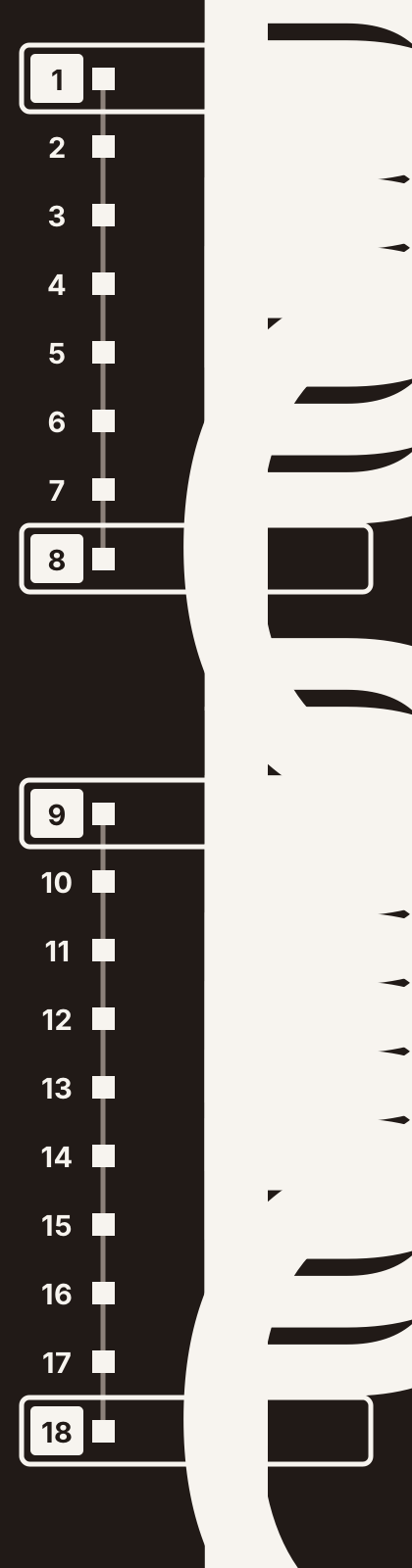
The same pins may be described in board documentation as J7 pins 1, 2, 3, and 10. The table below uses the enclosure numbers visible on the device.
| ST-Link signal | M1 enclosure pin | M1 signal | Purpose |
|---|---|---|---|
| VTref / VAPP | 9 | +3.3 V | Target-voltage reference; do not use it as the M1's power source |
| SWCLK | 10 | PA14 | SWD clock |
| SWDIO | 11 | PA13 | SWD data |
| GND | 18 | GND | Common ground |
Do not connect the programmer to enclosure pin 1 (+5 V). Power the M1 from its own USB-C connection during recovery.
Connect the programmer
- Disconnect the ST-Link from the computer and disconnect USB power from the M1.
- Connect SWCLK to M1 pin 10.
- Connect SWDIO to M1 pin 11.
- Connect GND to M1 pin 18.
- If the ST-Link has a target-voltage-sense input, connect VTref/VAPP to M1 pin 9.
- Recheck the labels at both ends of every wire. Keep the wires short.
- Power the M1 from its own USB-C cable.
- Connect the ST-Link to the computer.
If you are using the ST-Link section of a Nucleo board, disconnect it from the Nucleo target MCU as described in that board's manual before wiring it to the M1.
Reflash the STM32
- Open STM32CubeProgrammer and select ST-LINK.
- Select the detected probe and choose SWD as the port.
- Select Connect. Confirm that CubeProgrammer identifies an STM32H573 device before continuing.
- Open Erasing & Programming.
- Select the official M1
*_wCRC.binfile. - Set the start address to
0x08000000. - Enable Verify programming.
- Perform a full chip erase, then start programming.
- Wait until both programming and verification report success. Do not disconnect power or move the wires during this operation.
- Select Disconnect, unplug the ST-Link, and then restart the M1.
The M1's STM32 has two flash banks. A full chip erase removes both copies before the selected recovery image is written. Device settings stored in internal flash may return to defaults.
If CubeProgrammer cannot connect
- Confirm that the M1 is powered from USB-C.
- Confirm that the ST-Link and M1 share a solid ground.
- Check that SWCLK and SWDIO are not swapped.
- Make sure you used the 10-pin group labeled 9–18, not the 8-pin group labeled 1–8.
- Shorten the wires and reduce the SWD frequency in CubeProgrammer.
- Disconnect both devices, reconnect the wiring, power the M1, and reconnect the ST-Link.
The external connector does not expose the STM32 reset signal. Do not open the enclosure or modify option bytes to follow an unrelated “connect under reset” guide. Contact MonstaTek support if normal SWD connection still fails.
After recovery
The M1 should restart on the restored STM32 firmware. Confirm that the screen, buttons, microSD card, and firmware version work normally. This procedure does not replace the separate ESP32-C6 firmware.
If recovery fails, email support@monstatek.com with the firmware filename, CubeProgrammer log, ST-Link model, and a description of the M1's behavior.