Bluetooth
Discover BLE devices, inspect and save advertising data, measure signal strength, and browse GATT services.
Before you start
BLE addresses, names, manufacturer data, services, and values can identify people or equipment. Connect or write only with authorization.
Leave Wi-Fi before opening Bluetooth.
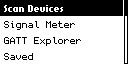
Scan Devices
Scan Devices discovers nearby Bluetooth Low Energy advertisements and displays their available identity and advertising data.
- Wait while the M1 finds nearby devices.
- Browse by name or address; unnamed entries are numbered for the session.
- Press Center on Details.
- Use Left and Right through identity, RSSI, flags, UUIDs, manufacturer data, and parsed fields.
- Press Center on Save to name a live record under ble/.
- Press Back to the device list, then Back to leave.
A saved record is not a pairing record and does not prove the device is connectable.
Signal Meter
Signal Meter tracks the selected device’s received signal strength to help with relative proximity checks.
- Select the target.
- Wait while the M1 measures the signal.
- Read averaged RSSI and signal category.
- Move slowly with consistent orientation.
- On Signal lost, move closer or confirm advertising continues.
- Press Back to stop.
RSSI shows relative signal strength, not exact distance. Walls, people, orientation, interference, interval, and transmit power affect it.
GATT Explorer
GATT Explorer connects to a BLE device and browses its services, characteristics, and supported actions.
- Select a device and press Center on Connect.
- Wait for connection and service discovery.
- Select a service, then a characteristic.
- Choose an action supported by the characteristic.
- Press Back one level at a time to return or disconnect.
| Action | Instructions |
|---|---|
| Details | Review UUID, handle, properties, and descriptors. |
| Read | Request current length and hexadecimal bytes. |
| Write | Enter even-length hex up to 64 bytes and send with response. |
| Write No Rsp | Send even-length hex without application confirmation. |
| Notify | Subscribe via CCCD and watch notification values; Back stops. |
| Indicate | Subscribe to acknowledged indications when supported; Back stops. |
Do not write unless the exact characteristic, value, and expected effect are documented.
Saved
Saved opens previously stored BLE advertisement snapshots without making a live connection.
- Select a .ble file under ble/.
- Press Center to open it.
- Use Left and Right through stored details.
- Compare with a new scan when current state matters.
- Press Back to close.
Opening a saved record does not connect to the device or provide live GATT controls.
Troubleshooting
| Problem | What to do |
|---|---|
| No devices | Wait, move closer, and confirm advertising. |
| Radio busy | Leave Wi-Fi. |
| Connect failed | Confirm connectable, nearby, and not connected elsewhere. |
| Read failed | Security or pairing may be required. |
| Not subscribable | No usable CCCD or Notify/Indicate property. |
| Write rejected | Verify properties, security, byte format, and authorization. |
| Saved empty | Check .ble files under ble/ and card mount. |
Visual guide
Need help? Email support@monstatek.com and include the firmware version and screen name.